

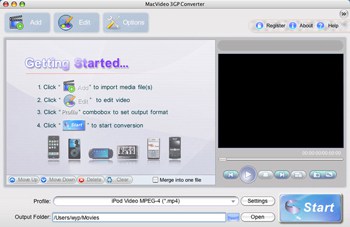
The easiest way to convert videos between 3GP and other formats
MacVideo 3GP Converter is an excellent Mac 3GP Converter made especially for 3GP mobile users. With this wonderful Mac 3GP Video Converter you can convert videos in almost any format to 3GP with ease. The Mac 3GP Converter can also convert 3GP to most video formats such as MP4, MOV, WMV, FLV, MKV, etc. What’s more, this Mac 3GP Converter features extended video edit functions, you can trim video duration, crop video size, add watermarks, merge video files and so on.
- Convert 3GP on Mac to most video formats.
- Support all popular digital players like iPad, iPhone, iPod, PSP, etc.
- Powerful video editing functions – Crop video, add special effects, etc.
Note: Windows version is also available
 System Requirements
Intel-based Mac(32-bit or 64-bit)
Mac OS X 10.5 Leopard or 10.6 Snow Leopard
Key Features

Easy to use
It requires no technical knowledge to accomplish the converting. This MacVideo AVI Converter has an intuitive interface, it enable you finish the conversion task within several clicks.

Powerful Video Editing Functions
You can trim the video to get any part of the movie you would like to convert, crop the video to get rid of the margins, adjust the frame size to fit your device, embed watermarks, and so on.

Batch conversion supported
You can select all video files you want to convert and this Mac 3GP Converter software will automatically convert them one by one.

Simple settings provided
All settings are available in the interface and submenu. You may pause, stop or continue the conversion at anytime you like.

More additional functions
The MacVideo 3GP Converter can capture pictures from videos during preview and save them as BMP, JPG images, and shutdown your computer automatically after the conversion finished.

Support previewing video files
MacVideo 3GP Converter insets a preview window in the program so that you can preview your DVD movies before converting videos.
User Guide
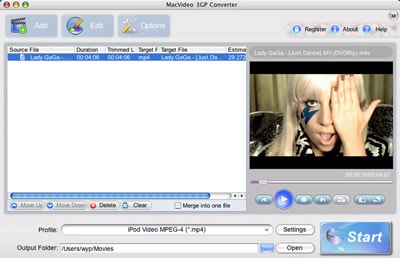
Step 1: Click add button to open video file.
Click to load video or audio files from computer or other devices(like USB device, camcorder, MP4 player, etc) directly.
Step 2. Select output formats and destination folder
Select proper output formats from the drop-down list of “Profile”. Then select destination folder for converted media files from the drop down list of “Output”. You also can click “Advanced..” to customize the output settings in details . You can set the video resolution, frame rate, audio channels, bitrates etc.
Step 3. Edit videos (Optional)
Click to trim video and set the start time & end time to get multiple clips as you like. Or click and you can crop the frame size, append effects, add picture/text watermark, or edit subtitle.
Step 4. Convert
- Click the Start button to start the Video Converting task.